


 Monitoring
Tactical Overview
The Tactical Overview is one of the monitoring views available in NetEye.Cloud.
It is useful after you enter the monitoring area and need a quick operational summary before drilling down into specific hosts, services, or dashboards.
Use this view as a starting point to understand the current health of the monitored environment and to decide where attention is required first.
To open it, use the left navigation menu and go to Overview > Tactical Overview.
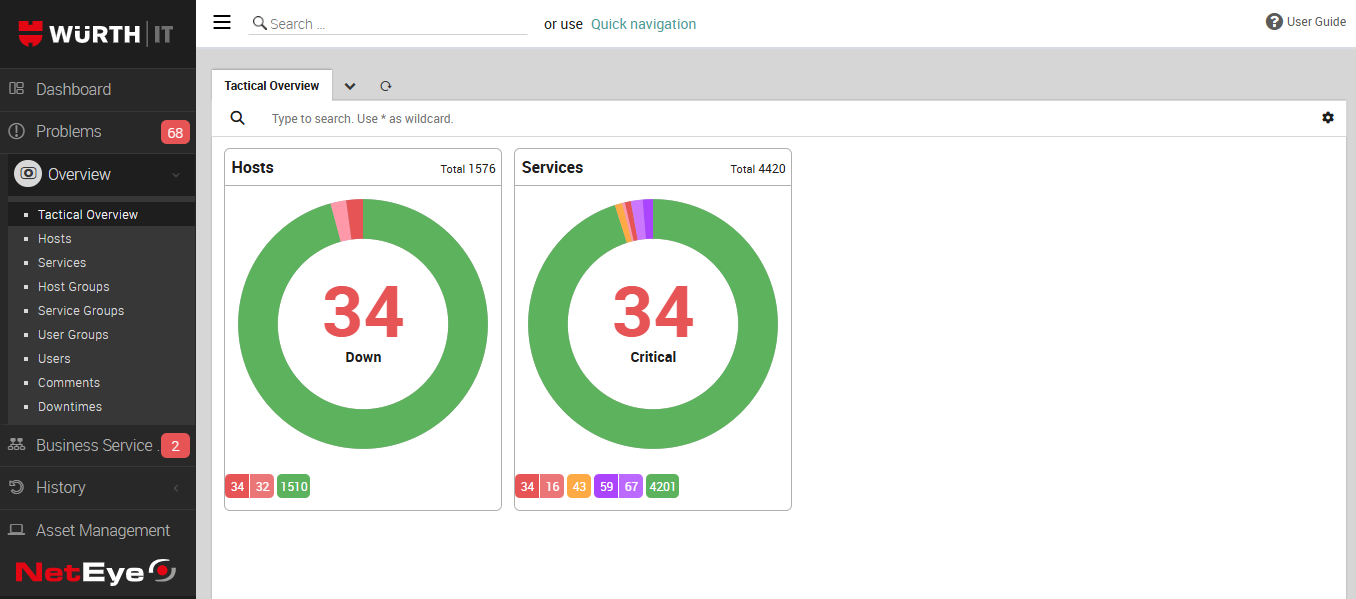
Fig. 199 The Tactical Overview
Here you can see high-level status information for the monitored infrastructure, including an aggregated view of hosts and services and their current states. The view helps identify whether there are critical or warning conditions, whether acknowledgements or downtimes are already in place, and which areas may require follow-up investigation.
The overview contains status boxes and counters that summarize the monitoring situation. It includes separate sections for Host State and Service State, where you can immediately see how many objects are Up, Down, Unreachable, Pending, OK, Warning, Critical, or Unknown.
The color coding makes it easier to distinguish normal conditions from states that require attention. By clicking on the status names you will be able to see a list of related hosts/services and from there go to a particular host/service details view.
The Tactical Overview is especially helpful for daily checks, shift handovers, and first-level troubleshooting. Instead of opening individual objects immediately, you can first assess the overall situation and then navigate to the relevant monitoring details from there.

