


 Cyber Threat Intelligence - SATAYO
SATAYO Findings
Findings represent the result of the analysis performed on evidence collected during regular SATAYO scans. The frequency of running scans is defined in a dedicated Scan times by type of Findings section.
The search process is based on the asset domains that are identified, mapped, and configured during the onboarding phase with a SATAYO analyst. These domains define the monitoring perimeter and serve as the foundation for detecting relevant findings.
The evidence is gathered from publicly accessible sources and correlated to identify elements that contribute to the organization’s external exposure. This exposure is represented through the Attack Surface Index, a numerical value calculated based on the collected evidence and associated findings.
The index ranges from 0 to 100, where 0 indicates no detected exposure and 100 represents the maximum level within the scoring model. Higher values indicate a broader external attack surface, meaning a greater amount of publicly available information and potentially exploitable elements.
The value of the index is also influenced by the size and digital footprint of the organization. Larger organizations with more domains, services, and publicly accessible assets may naturally present higher index values.
With each new scan, newly identified findings are compared with those previously detected. This ensures that the list is continuously updated, highlighting new elements while maintaining visibility on existing ones and their current status.
Findings are grouped into three main categories:
Infrastructure
Data Files & People
Deep & Dark Web
These categories reflect different areas of exposure and collectively contribute to the evaluation of the organization’s Attack Surface Index.
A dedicated Findings page provides a complete and up-to-date list of all detected findings. The structure and details of this page are described in the following sections.
Working with the Findings Page
All detected findings are available on a dedicated Findings page, which provides a consolidated view of the evidence identified during SATAYO scans. This page allows you to explore and review findings across the monitored environment and to focus on the areas that require attention.
Findings can be filtered to narrow the scope of the analysis. Users may limit the view to a specific organization (when associated with multiple organizations) or focus on a particular domain within the monitored perimeter. Findings can also be filtered by their type, which helps identify specific categories of exposure. The full range of finding types is described in the following chapters.
Additional filtering options allow findings to be viewed according to their related ticket attributes, such as ticket status or priority. In general, tickets are created and managed as part of the regular workflow used to process and address detected findings.
Each finding is associated with an identifier that indicates the type of issue detected. These identifiers are not unique and should be understood as attributes used to categorize findings rather than as individual reference numbers.
For deeper investigation, users can open the detailed view of a finding. This view provides additional context and supporting information about the detected evidence, helping users better understand the nature and potential impact of the issue.
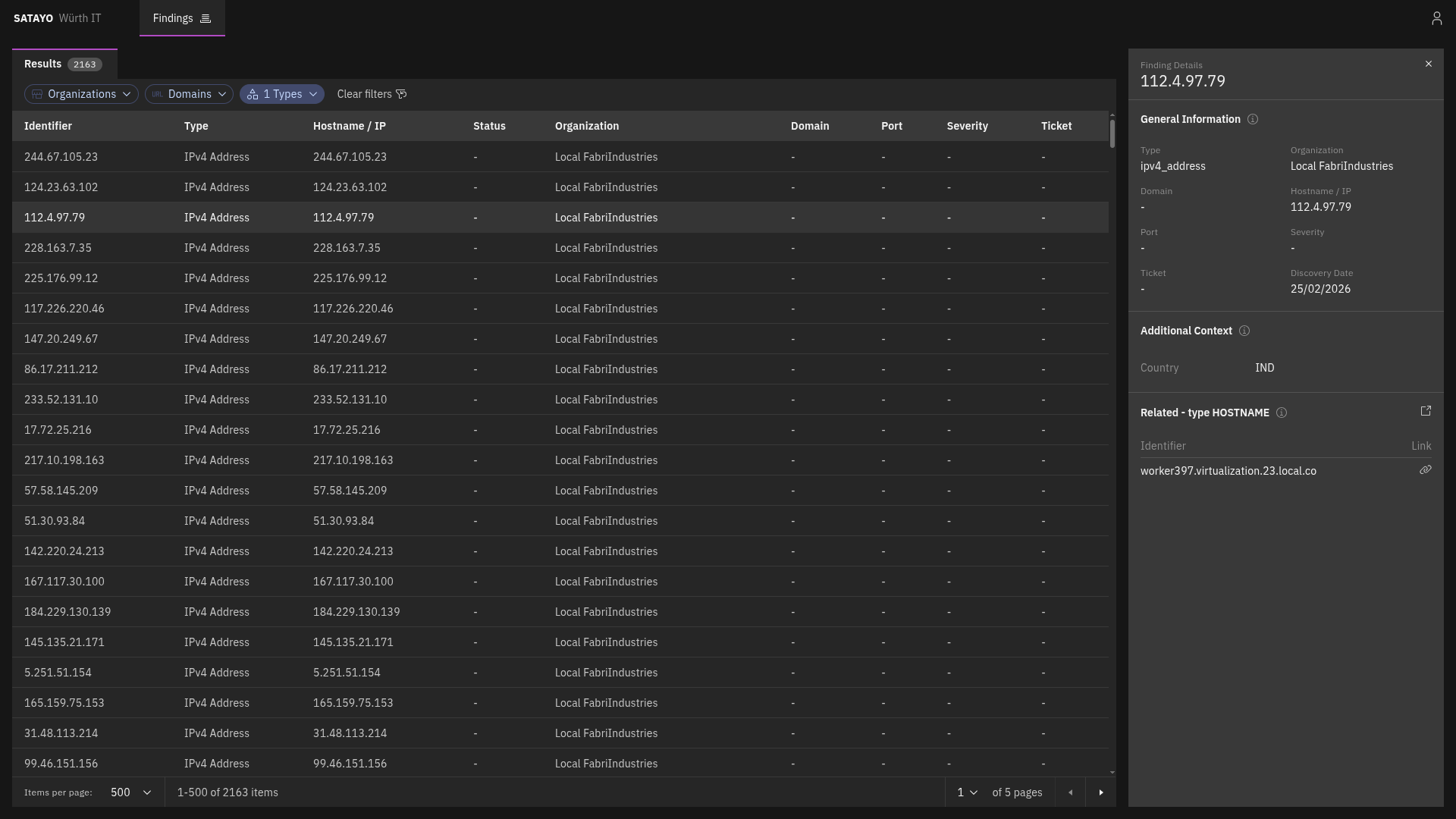
Fig. 237 List of items with the preview panel open of a selected item
From the detailed view, clicking on the icon near the Related title opens another tab with the list filtered to show its related findings. Clicking on the link icon on a related finding opens the same view, with the corresponding finding’s preview panel automatically displayed.
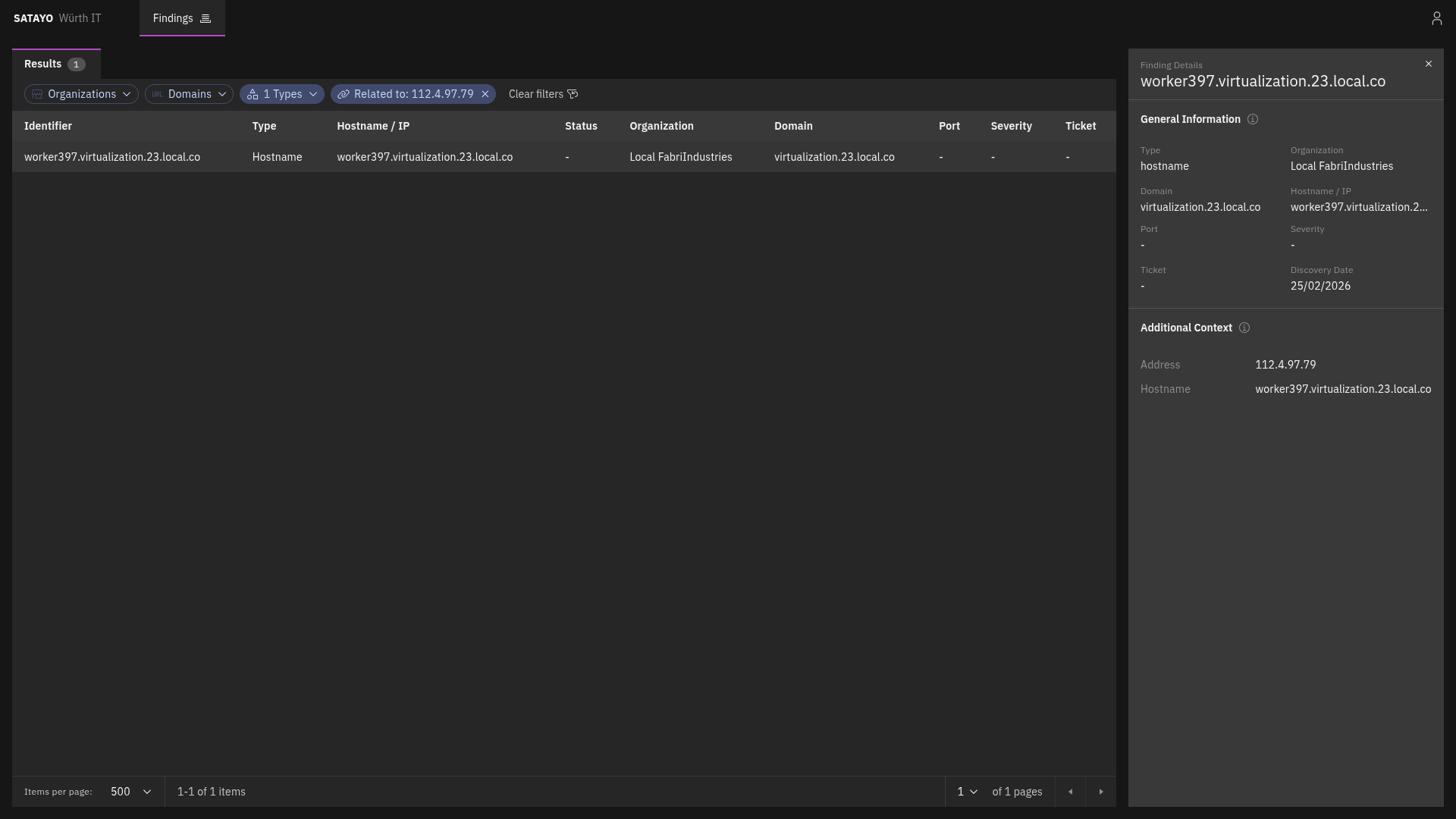
Fig. 238 List of related items with the preview panel open of a selected item
Domain
MITRE ATT&CK Techniques
The following MITRE ATT&CK techniques are used to classify this finding:
Reconnaissance
The domain findings list all subdomains discovered for each configured monitored domain. Domain, like an IP address, is a human-readable name that corresponds to one or more IP addresses, making it easier to identify and remember. It is one of the starting points for SATAYO’s exposure assessment analysis, and it can provide valuable information about the services and applications running on a network. Domains are identified through multiple techniques during SATAYO scans, such as DNS resolution/subdomain enumeration or Stealer Logs.
Note
The domain sub-types — Suspicious, Correlated, Similar, TLD, and Phishing — listed in the Scan times by type of Findings table refer to the configured monitored domain itself, not to the domain findings described here.
Domain findings act as aggregators: each finding collects related evidence discovered under the same domain. Currently, a domain finding can aggregate Services, Mail, SSL/TLS certificates, Email addresses, and Stealer Logs related to the same domain, as well as the IPv4 addresses it resolves to.
Additionally, a domain finding includes a property indicating whether its value is used as target of an MX Record.
Every domain finding carries a severity field that reflects how sensitive it is:
UNASSIGNED — the default level, assigned until the finding has been reviewed and reclassified. Its mere existence doesn’t pose a risk, so it does not contribute directly to the EAIV score.
RISK ACCEPTED — the resource is considered low risk.
POTENTIALLY CRITICAL — the resource may pose a significant risk and warrants review.
CRITICAL — the resource is a high-value target, such as an intranet website, password manager, private cloud, or administrative page.
The last three levels are assigned when a domain is found through a Stealer Log, based on the type of website recorded in the log. The severity classification is assigned by SATAYO but can be adjusted on request if the assigned level does not reflect the actual sensitivity of the resource.
IPv4 Address
MITRE ATT&CK Techniques
The following MITRE ATT&CK techniques are used to classify this finding:
Reconnaissance
The IPv4 address item represents a publicly reachable IP address discovered by SATAYO. It can be correlated to other items, such as Ports and Domains.
Port
MITRE ATT&CK Techniques
The following MITRE ATT&CK techniques are used to classify this finding:
Reconnaissance
Each port item complements an IPv4 address item and represents an exposed port on which a service or application at the IP address is listening.
Registry
MITRE ATT&CK Techniques
The following MITRE ATT&CK techniques are used to classify this finding:
Reconnaissance
The registry item consists of the subnet blocks where the retrieved found IP address resides. The addresses inside are scanned to see if there are other resolvable domains that, if found, are added to the list of domains and constitute an additional base for future scans and analysis.
CVE
MITRE ATT&CK Techniques
The following MITRE ATT&CK techniques are used to classify this finding:
Reconnaissance
Resource Development
Initial Access
The CVE item represents a publicly known vulnerability identified on a specific host during SATAYO analysis. Each item corresponds to a single CVE identifier detected on a particular host. If multiple vulnerabilities are discovered on the same host, a separate CVE item is created for each vulnerability.
For each vulnerability, SATAYO provides a link to the U.S. National Vulnerability Database (NVD), maintained by the National Institute of Standards and Technology (NIST), where detailed technical information about the CVE can be found.
When available, SATAYO also provides links to publicly known exploits or Proof-of-Concept (PoC) implementations associated with the vulnerability.
Additional contextual indicators are included to help prioritize remediation:
KEV (Known Exploited Vulnerabilities) — Indicates whether the vulnerability is listed in the catalog maintained by the Cybersecurity and Infrastructure Security Agency (CISA), which tracks vulnerabilities that are known to be actively exploited in the wild.
EPSS (Exploit Prediction Scoring System) — A data-driven model that estimates the probability that a vulnerability will be exploited in real-world attacks. The EPSS model produces a probability score expressed as a percentage (0–100%). The higher the score, the greater the likelihood that the vulnerability will be exploited.
EPSS is managed by Forum of Incident Response and Security Teams (FIRST), and SATAYO is included in the official list of EPSS-supported vendors.
Service
MITRE ATT&CK Techniques
The following MITRE ATT&CK techniques are used to classify this finding:
Reconnaissance
A service item represents a specific service or application exposed over HTTP on a particular port of an IP address and identified by a domain.
It is always associated with a domain, because the domain is a determining factor in request routing. The HTTP server may use the domain to route requests to the appropriate virtual host or service.
It provides information about the exposed HTTP service and web server, including:
Open ports with SSL/TLS enabled
Open ports without SSL/TLS enabled
Also service metadata, such as:
HTML title
meta-generator
maintainer email addresses
exposed server headers
unencrypted protocols in use
detected technologies
Linked Domains
The following five finding types are grouped in this category because they all refer to domains. For each detected domain, information such as registrant, country, and creation date is shown. If SATAYO finds MX record details or blacklist presence, this information is also shown.
Domain Suspicious
MITRE ATT&CK Techniques
The following MITRE ATT&CK techniques are used to classify this finding:
Reconnaissance
A Domain suspicious item shows domains classified as suspicious because they contain the company name.
Domain Phishing
MITRE ATT&CK Techniques
The following MITRE ATT&CK techniques are used to classify this finding:
Reconnaissance
The Domain phishing item shows known malicious domains or URLs that are currently performing phishing activities.
Domain Similar
MITRE ATT&CK Techniques
The following MITRE ATT&CK techniques are used to classify this finding:
Reconnaissance
The Domain similar item shows all registered domains similar to the main one. These domains could be used for phishing activities. If a domain was registered recently, chances are that it can be used for malicious purposes.
Domain TLD
MITRE ATT&CK Techniques
The following MITRE ATT&CK techniques are used to classify this finding:
Reconnaissance
The Domain TLD item shows all top-level domains registered with the same base name as the main domain.
Stealer Logs
MITRE ATT&CK Techniques
The following MITRE ATT&CK techniques are used to classify this finding:
Reconnaissance
The Stealer Logs item is a collection (logs) of compromised data associated with your monitored domain, distributed through underground marketplaces. They originate from infections caused by “stealer” malware (often delivered via trojanized or cracked software) which exfiltrates data from infected systems, including browser-stored credentials, session cookies, autofill data, and other locally stored secrets.
Email Address
MITRE ATT&CK Techniques
The following MITRE ATT&CK techniques are used to classify this finding:
Reconnaissance
The Email Address item shows the email address belonging or related to a domain under analysis. It indicates whether an account with that email address was present in a stealer log, data breach, or paste.
Email addresses shown here were retrieved by SATAYO through the acquisition of compromised data from multiple sources: Stealer Logs (collections of compromised data, distributed by third parties through underground marketplaces), Data Breaches (incidents in which information is exposed to unauthorized parties), and Pastes (collections of data posted on external paste sites, such as Pastebin).
For each email address found, SATAYO can also provide information about:
Social Networks and Web Sites: social networks, platforms, and other web sites — such as LinkedIn, GitHub, Amazon, etc. — where accounts related to the monitored email address have been detected
Extra Attributes: additional data associated with the email address, such as profile information discovered in data breaches.
Resource
MITRE ATT&CK Techniques
The following MITRE ATT&CK techniques are used to classify this finding:
Reconnaissance
The Resource item represents a finding associated with a specific URL. A resource is reported when it is referenced in an entry of a stealer log containing a username or password for an account associated with that specific URL.
Account
MITRE ATT&CK Techniques
The following MITRE ATT&CK techniques are used to classify this finding:
Reconnaissance
Credential Access
An Account item represents an online account associated with your organization that has been identified in compromised data sources, such as stealer logs or data breaches. Accounts are flagged when they appear in a stealer log or breach containing exposed credentials or session information.
For each account found, SATAYO provides information about:
Username associated with the account
The resource associated with the account (if present)
Presence in stealer logs/data breaches and related email addresses (if present)
It is recommended to verify the authenticity of any account found in this section and take immediate action by resetting credentials and enabling multi-factor authentication if available.
Account password
If credentials for an account are found in a stealer log or data breach, SATAYO provides information about them in the account password finding. If the password comes from a data breach, it can either be in plaintext or hashed format. If it comes from a stealer log, it is always in plaintext format. In any case, if credentials are found, it is recommended to reset the password immediately and enable multi-factor authentication if available.
Should the password be reused across multiple services, it is highly recommended to change the password for all accounts with the same email address and using the same credentials immediately to avoid potential compromise of other accounts.
Data Breach
MITRE ATT&CK Techniques
The following MITRE ATT&CK techniques are used to classify this finding:
Reconnaissance
T1589.002 Gather Victim Identity Information: Email Addresses
T1589.003 Gather Victim Identity Information: Employee Names
Resource Development
Initial Access
The Data Breach item helps analysts identify breached data findings linked to corporate identities. It shows corporate accounts mapped to the analyzed organization that appear in external data breach scenarios.
A data breach is a security incident in which information is exposed to unauthorized parties. A breached account represents the presence of one or more corporate accounts in an external data breach.
For each data breach found, SATAYO provides information about:
Name: Unique data breach identifier.
Title: Data breach title.
Domain: Domain of the primary website the breach occurred on.
Description: Overview of the breach.
Breach Date: Date when the breach originally occurred.
Last Update: The date and time the breach was modified.
Compromised accounts: Total number of compromised accounts loaded into the data breach.
Compromised data: Nature of the data compromised in the data breach.
Spread: Whether the data breach is not very widespread, moderately widespread or very widespread.
Typology: Whether the data breach contains low-criticality data, moderately critical data or highly critical data.
Complexity: Whether the data breach contains no complexity measures, medium level of complexity measures or high level of complexity measures.
Accounts: Total number of compromised corporate accounts associated with the data breach.
The following flags provide additional data breach context:
Verified: Data breach legitimacy has been validated with reasonable confidence.
Fabricated: The data breach likely did not originate from the claimed source, but it may still contain real personal data.
Sensitive: Data breach visibility is restricted due to the nature of the exposed context.
Retired: Data breach was removed from active circulation/search in the source system.
Spam: Data breach is primarily linked to targeted spam activity rather than a direct system compromise.
Paste
MITRE ATT&CK Techniques
The following MITRE ATT&CK techniques are used to classify this finding:
Reconnaissance
Resource Development
Initial Access
A Paste item represents the presence of one or more corporate email addresses on an external paste site, such as Pastebin.
For each paste found, SATAYO provides information about:
The website that is the source of the paste.
The link to the specific paste.
The date on which the paste was published.
Which email addresses are present in that paste.
Sandboxes
MITRE ATT&CK Techniques
The following MITRE ATT&CK techniques are used to classify this finding:
Reconnaissance
Initial Access
The Sandboxes item represents evidence found within public malware sandboxes and related to the monitored organization. A sandbox “detonates” files (purposefully launches them in controlled virtual environments) to track their activity and communications, producing detailed reports that include files opened, created, and written, registry keys set, domains contacted, and more.
Evidence is detected using dedicated YARA rules, preconfigured by the team of analysts and built from the monitoring scope and intelligence requirements defined with the customer during onboarding.
For each item, SATAYO provides information about:
The URL of the analyzed evidence.
The country from which the file was uploaded.
The size and extension of the file.
This finding may include malicious artifacts that reference the monitored organization, as well as generic files uploaded to sandboxes by unaware users. When confidential or critical files are uploaded, the associated report includes guidance on how to properly mitigate the exposure.
Deep & Dark Web
MITRE ATT&CK Techniques
The following MITRE ATT&CK techniques are used to classify this finding:
Reconnaissance
The Deep & Dark Web item contains evidence retrieved by SATAYO from Deep & Dark Web sources, such as leak forums, onion sites, illegal marketplaces, and social networks. The analysis is performed using several keywords related to the analyzed domain. For each item found, the link to the mention and a snippet of its content are provided.
Bug Bounty
MITRE ATT&CK Techniques
The following MITRE ATT&CK techniques are used to classify this finding:
Reconnaissance
The Bug Bounty item shows evidence of occurrences related to monitored domains found within the Open Bug Bounty portal. The portal allows an organization to manage the Vulnerability Disclosure activity in a coordinated way with the researchers who discover it.
GitHub
MITRE ATT&CK Techniques
The following MITRE ATT&CK techniques are used to classify this finding:
Reconnaissance
The GitHub item shows information deemed interesting obtained from GitHub repositories related to the monitored domain. It is possible that some files may contain confidential information. Items such as users, passwords, certificate keys, configuration files, and log files were searched. The link to the repository and the evidence found can be viewed in the list.
Published File
MITRE ATT&CK Techniques
The following MITRE ATT&CK techniques are used to classify this finding:
Reconnaissance
The Published File item shows files found on the analyzed domain with an extension deemed interesting. For each file found, SATAYO provides information such as the title, author, creation date, and size.
It is recommended to check the contents of these files and remove them from the Internet if they contain confidential information. The link to the file is provided so that it can be verified.
Phone Number
MITRE ATT&CK Techniques
The following MITRE ATT&CK techniques are used to classify this finding:
Reconnaissance
The Phone Number item shows every phone number published within the institutional website of the analyzed domain. It is suggested not to publish direct telephone numbers of personnel working within the organization, as they could favor the activity of a social engineer.
For each phone number found, SATAYO provides information such as:
Prefix: the country code associated with the phone number, along with the country name.
Phone: the phone number as published on the website.
Name: the name of the person or office associated with the phone number, when available.
Subtitle: additional context about the role or department associated with the phone number, when available.
Location: the address associated with the phone number, when available.
Source: the link to the page on which the phone number was found.
Some of these fields may be empty, depending on the information published on the source page.
Storage
MITRE ATT&CK Techniques
The following MITRE ATT&CK techniques are used to classify this finding:
Reconnaissance
Discovery
The Storage item represents a publicly exposed storage resource belonging to the organization, such as an Amazon S3, Google Cloud Storage, or Azure Blob Storage. When a storage resource is found to be publicly accessible, its internal content is listed.
For each storage resource found, SATAYO provides information about:
The URL of the storage resource.
The type of storage resource (e.g. S3 bucket).
The number of files it contains.
Storage findings represent publicly exposed storage resources that may contain leaked files or sensitive data. They expand the investigation surface for company-related data leak exposure.
Credit Card
MITRE ATT&CK Techniques
The following MITRE ATT&CK techniques are used to classify this finding:
Reconnaissance
Impact
The Credit Card item represents a credit card issued by the monitored organization and offered for sale within an underground marketplace. Cards are stolen through a multitude of techniques, including phishing campaigns, data breaches, sniffing on public Wi-Fi networks, and physical cloning at ATMs.
Each finding corresponds to a single card published by a seller, and it is identified by the marketplace on which it was detected together with the identifier assigned to the listing.
Note
This finding is available only to credit institutions that issue credit cards.
For each card detected, SATAYO provides information about:
Inserted: the date on which the card was detected within the marketplace.
Source: the marketplace on which the card is offered for sale.
Source ID: the identifier assigned to the listing by the marketplace.
Bank: the name of the institution that issued the card, as declared by the seller.
Hidden CC: the partial card number published by the seller. Marketplaces usually mask most of the digits and expose only the initial part, which identifies the issuing circuit and the institution.
Card Type: the type of card declared within the listing.
Expiration Date: the expiration date of the card. Cards that are still valid represent a more urgent risk, as they can be used for fraudulent transactions.
CVR: the validity rate declared for the card, expressed as a percentage. Sellers use this value to indicate how likely the card is to be still usable.
Reviews: the feedback published within the marketplace about the listing or the seller.
Country, State, City and ZIP: the geographic information associated with the card.
Seller DB: the name of the archive the seller attributes the card to. The same archive is often used to sell several cards originating from the same compromise.
Seller Tag: the nickname used by the seller within the marketplace.
Seller Rate: the reputation score of the seller within the marketplace.
Price: the price at which the card is offered for sale.
The following flags indicate which additional data is offered for sale together with the card, without disclosing its content:
CVV: whether the card verification value is included.
Holder Name: whether the name of the cardholder is included.
Date of birth: whether the cardholder’s date of birth is included.
SSN: whether the social security number of the cardholder is included.
EMail: whether the email address of the cardholder is included.
Phone: whether the phone number of the cardholder is included.
Address: whether the address of the cardholder is included.
More data associated with the card increases the risk of fraud, identity theft, and social engineering attacks against the cardholder. It is recommended to block or reissue the cards detected in this section and to inform the cardholder of the exposure.
Mobile App
MITRE ATT&CK Techniques
The following MITRE ATT&CK techniques are used to classify this finding:
Reconnaissance
The Mobile App item shows organization-related mobile applications uploaded to the Play Store or other third-party stores.
Applications are scanned periodically, and different versions of the same application may be visible. For each application found, SATAYO provides information about:
The version of the application.
Whether an antimalware engine detected malware in that version.
If malware is detected in a version, it is flagged, helping analysts identify potentially malicious or risky mobile applications associated with the organization.
Blacklist Domain
MITRE ATT&CK Techniques
The following MITRE ATT&CK techniques are used to classify this finding:
Reconnaissance
The Blacklist Domain item shows organization-related domains that are listed in external blacklists, identified from the blacklist records associated with a domain.
The presence of a domain within a blacklist can compromise the provision of services and damage the organization’s reputation: if browsers or organizations enforce controls such as content filtering, connections to a blacklisted domain may be terminated or refused. Reviewing these findings allows a threat intelligence analyst to assess the reputational and operational risk associated with a blacklisted domain and take appropriate remediation action.
Several blacklists allow the removal of a resource to be requested once its reputation has been verified.
Blacklist IP
MITRE ATT&CK Techniques
The following MITRE ATT&CK techniques are used to classify this finding:
Reconnaissance
The Blacklist IP item shows organization-related IP addresses that are listed in external blacklists, identified from the blacklist records associated with an IP address.
For each finding, SATAYO reports the blacklisted IP address, the type of blacklist it appears in, and any additional data provided by the blacklist source, such as the reason for the listing.
The presence of an IP address within a blacklist can compromise the provision of services and damage the organization’s reputation: if mail servers or organizations enforce controls such as reputation filtering, messages and connections originating from a blacklisted IP address may be rejected or silently dropped. Reviewing these findings allows a threat intelligence analyst to assess the reputational and operational risk associated with a blacklisted IP address and take appropriate remediation action.
Several blacklists allow the removal of a resource to be requested once its reputation has been verified.
Each Blacklist IP finding is correlated with the IPv4 Address finding for the same IP address, so an analyst can navigate from an IP address to its blacklist records and back.
SSL/TLS
MITRE ATT&CK Techniques
The following MITRE ATT&CK techniques are used to classify this finding:
Reconnaissance
The SSL/TLS item shows the certificates presented by the exposed services discovered on domain-related IPs, together with the outcome of every check performed on them. Checks may return evidence of expired certificates or of the use of obsolete and insecure cryptographic algorithms.
Each item lists the certificate’s identifying data (subject and issuer, serial number, validity dates, alternative names, signature and public key algorithm, key size), the certificate itself in PEM form, and the individual checks performed on it.
Every check carries its own severity: CRITICAL, HIGH, MEDIUM or LOW for a certificate defect, or OK where the check passed.
Ransomware
MITRE ATT&CK Techniques
The following MITRE ATT&CK techniques are used to classify this finding:
Reconnaissance
Initial Access
The Ransomware item reports victims published on ransomware leak sites worldwide.
For each victim, SATAYO provides:
Publication date: date the victim’s information was published on the leak site.
Group: the ransomware gang that claimed the attack.
Sector: industry the victim operates in.
Country: country where the victim is located.


Social Media
MITRE ATT&CK Techniques
The following MITRE ATT&CK techniques are used to classify this finding:
Reconnaissance
T1593.001 Social Media
Resource Development
T1586.001 Social Media Accounts
The Social Media item represents an account on a social network or another online platform that uses the name, domain, or identity of the monitored organization. Such an account may legitimately represent the organization, or it may have been created by a third party to simulate its identity, with the goal of establishing trust relationships with victims and preparing social engineering or phishing activities.
Each finding corresponds to a single account profile and is identified by its URL, which links to the profile on the external platform so that it can be reviewed directly.
For each account found, SATAYO provides information about:
Time: the date on which the account was detected.
Name: the platform hosting the account, such as a social network, a code-sharing site, or another online service.
Category: the type of platform on which the account was detected, for example coding, business, or social networking.
Url: the address of the account profile on the external platform.
Full name: the display name shown on the profile.
Username: the account handle used on the platform.
Biography: the profile description published on the account.
External URL: an additional address referenced from the profile, such as a personal or corporate website.
Business Account: whether the platform marks the account as a business profile.
Business Category: the business classification declared on the profile, when the account is a business profile.
Platforms expose different sets of attributes, therefore some of these fields may be empty for a given account.