
User Guide Functional Overview Requirements Architecture System Installation NetEye Additional Components Installation Setup The neteye Command Director NetEye Self Monitoring Tornado Business Service Monitoring IT Operation Analytics - Telemetry Geo Maps NagVis Audit Log Shutdown Manager Reporting ntopng Visual Monitoring with Alyvix Elastic Stack IT Operations (Command Orchestrator) Asset Management Service Level Management Cyber Threat Intelligence - SATAYO NetEye.Cloud Strategy Monitoring SOC System Administrator SOC Attacker Centric Cyber Threat Intelligence - SATAYO NetEye Update & Upgrade Backup and Restore How To NetEye Extension Packs Troubleshooting Security Policy Glossary
module icon Cyber Threat Intelligence - SATAYO
Introduction The Intelligence We Produce Mitre Attack Coverage Getting Started Settings SATAYO Items Intelligence Requirements Managed Service Request Form FAQ Changelog SATAYO Community
ntopng Visual Monitoring with Alyvix Elastic Stack IT Operations (Command Orchestrator) Asset Management Service Level Management Cyber Threat Intelligence - SATAYO Introduction to NetEye Monitoring Business Service Monitoring IT Operation Analytics Visualization Network Visibility Log Management & Security Orchestrated Datacenter Shutdown Application Performance Monitoring User Experience Service Management Service Level Management & Reporting Requirements for a Node Cluster Requirements and Best Practices NetEye Satellite Requirements TCP and UDP Ports Requirements Additional Software Installation Introduction Single Node Cluster NetEye Master Master-Satellite Architecture Underlying Operating System Acquiring NetEye ISO Image Installing ISO Image Single Nodes and Satellites Cluster Nodes Configuration of Tenants Satellite Nodes Only Nodes behind a Proxy Additional NetEye Components Single Node Cluster Node Satellites Nodes only Verify if a module is running correctly Accessing the New Module Cluster Satellite Security Backup and Restore Identity and Access Management External Identity Providers Configure federated LDAP/AD Emergency Reset of Keycloak Configuration Advanced Configuration Roles Single Page Application in NetEye Module Permissions and Single Sign On Within NetEye Importing User Federation Groups inside another Group Importing OIDC IdP Groups inside another Group Resources Tuning Advanced Topics Basic Concepts & Usage Advanced Topics Monitoring Environment Templates Monitored Objects Import Monitored Objects Data Fields Deployment Icinga 2 Agents Configuration Baskets Dashboard Monitoring Status Icinga2 Features VMD Permissions Notifications Jobs API Configuring Icinga Monitoring Retention Policy NetEye Self Monitoring Concepts Collecting Events Add a Filter Node WHERE Conditions Iterating over Event fields Retrieving Payload of an Event Extract Variables Create a Rule Tornado Actions Test your Configuration Export and Import Configuration Example Under the hood Development Retry Strategy Configuration Thread Pool Configuration API Reference Configure a new Business Process Create your first Business Process Node Importing Processes Operators The ITOA Module Configuring User Permissions Telegraf Metrics in NetEye Telegraf Configuration Telegraf on Monitored Hosts Visualizing Dashboards Customizing Grafana The NetEye Geo Map Visualizer Map Viewer Configuring Geo Maps NagVis Audit Log Overview Shutdown Manager user Shutdown Manager GUI Shutdown Commands Advanced Topics Overview User Role Management Cube Use Cases ntopng and NetEye Integration Permissions Retention Advanced Topics Overview User Roles Nodes RDP Client Building Tools Editor: Interface Overview Editor: Script Building Editor: Managing Scripts Designer: Interface Overview Designer: Interface Options Designer: Component Tree Selector: Interface Overview Test Case Management Dashboard Use Cases Overview Architecture Authorization Kibana Elasticsearch Cluster Elasticsearch Configuration Replicas on a Single Node Elasticsearch Performance tuning Overview Enabling El Proxy Sending custom logs to El Proxy Configuration files Commands Elasticsearch Templates and Retentions El Proxy DLQ Blockchain Verification Handling Blockchain Corruptions El Proxy Metrics El Proxy Security El Proxy REST Endpoints Agents Logstash Elastic APM Elastic RUM Elastic XDR Log Manager - Deprecated Overview Authorization in the Command Orchestrator Module Configuring CLI Commands Executing Commands Overview Permissions Installation Single Tenancy Multitenancy Communication through a Satellite Asset collection methods Display asset information in monitoring host page Overview Customers Availability Event Adjustment Outages Resource Advanced Topics Introduction The Intelligence We Produce Mitre Attack Coverage Getting Started Settings SATAYO Items Intelligence Requirements Managed Service Request Form FAQ Changelog SATAYO Community NetEye.Cloud as a SaaS solution Accessing NetEye.Cloud Monitoring with NetEye.Cloud Monitoring Environment Business Service Monitoring VMD SOC System Administrator (AdS) Access to NetEye and Elastic Elastic Dashboards Elastic Discover Elastic Alerts Elastic Rules Introduction to SOC Attacker Centric Service Description NetEye SIEM About SATAYO Threat Intelligence and Security Operations Before you start Update Procedure Single Node Upgrade from 4.46 to 4.47 Cluster Upgrade from 4.46 to 4.47 Satellite Upgrade from 4.46 to 4.47 DPO machine Upgrade from 4.46 to 4.47 Create a mirror of the RPM repository Sprint Releases Feature Troubleshooting Backup and Restore Tornado Networking Service Management - Incident Response IT Operation Analytics - Telemetry Identity Provider (IdP) Configuration NetEye Cluster on Microsoft Azure Introduction to NEP Getting Started with NEPs Online Resources Obtaining NEP Insights Available Packages Advanced Topics Upgrade to NetEye 4.31 Setup Configure swappiness Restarting Stopped Services Enable stack traces in web UI How to access standard logs Director does not deploy when services assigned to a host have the same name How to enable/disable debug logging Activate Debug Logging for Tornado Modules/Services do not start Sync Rule fails when trying to recreate Icinga object How to disable InfluxDB query logging Managing an Elasticsearch Cluster with a Full Disk Some logs are not indexed in Elasticsearch Elasticsearch is not functioning properly Reporting: Error when opening a report Debugging Logstash file input filter Bugfix Policy Reporting Vulnerabilities Glossary

Request Form

The form is designed to allow you to request specific Cyber Threat Intelligence activities beyond the standard SATAYO monitoring scope. It provides a direct channel to reach our analysts and request tailored investigations. Each request will be reviewed by our team and, if accepted, you will be contacted to align on the scope, expected delivery timeline, and—where the requested activities fall outside those defined in your contract the associated costs.
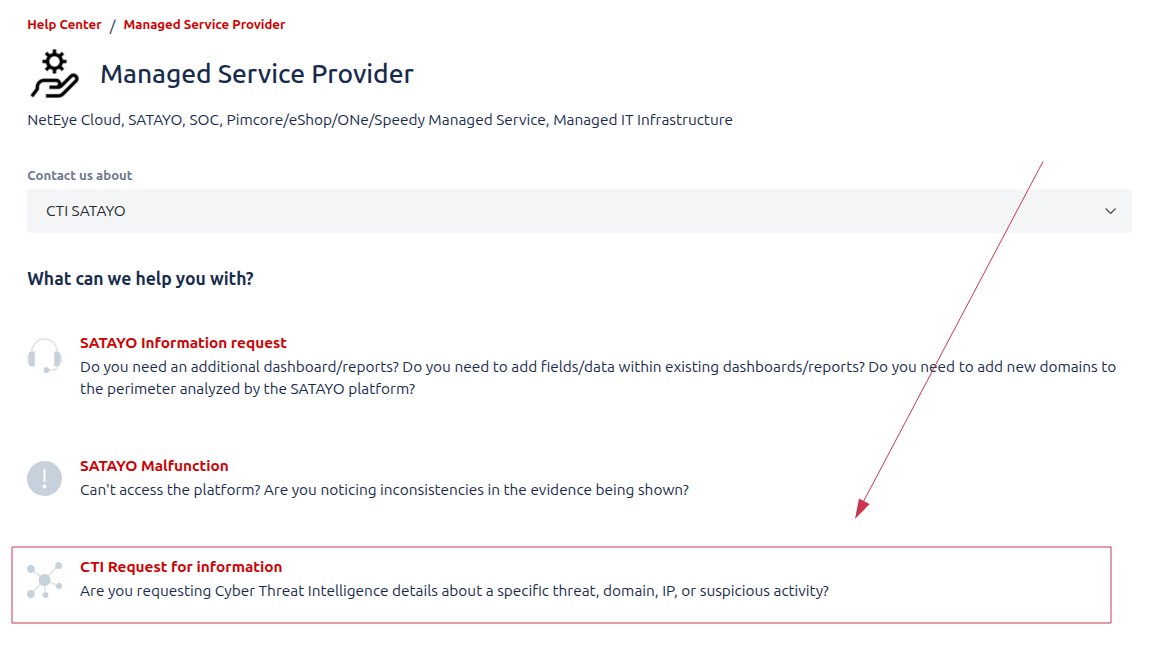
../../../_images/req01.png


The Form

The first part of the form requires you to provide some basic information about yourself and your organization, and to specify the type of request you are submitting. You can choose from a list of predefined request types, such as:
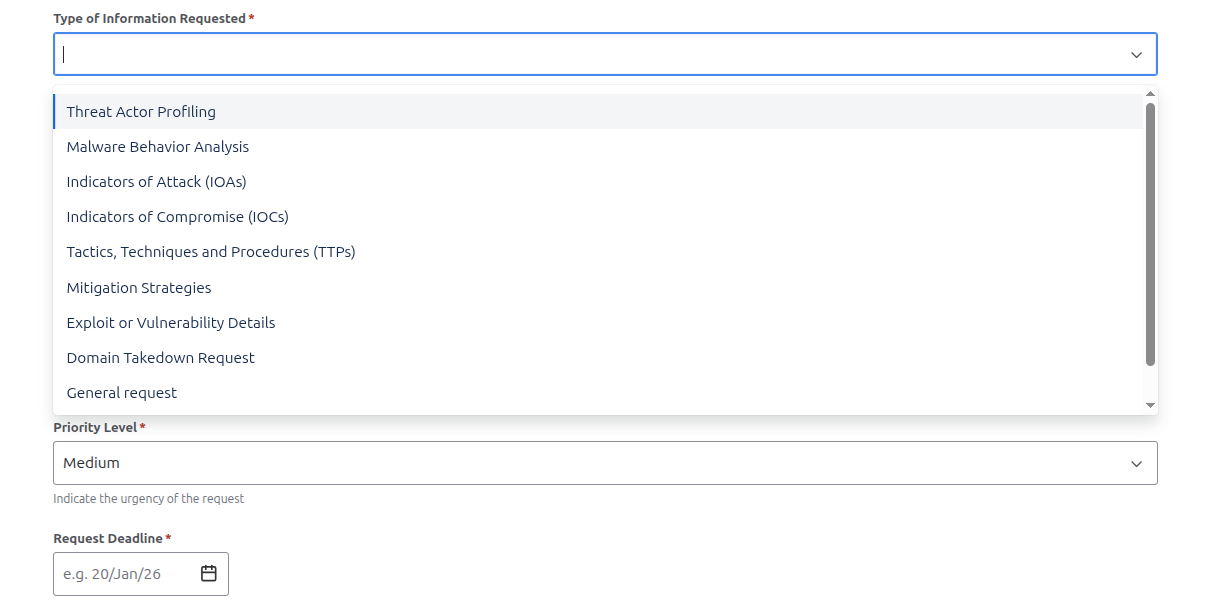
../../../_images/req03.png

REQUEST TYPE

DESCRIPTION

THREAT ACTOR PROFILING

Analyzing an “attacker’s identity”, motives, and tactics to understand how and why threats occur. It helps organizations anticipate attacks and strengthen defensive strategies.

MALWARE BEHAVIOUR ANALYSIS

Examining how malicious software operates, spreads, and impacts systems. It helps identify threats and develop effective detection and mitigation strategies.

INDICATORS OF ATTACK (IoAs)

Identify patterns of behavior that signal an active or impending attack. They enable early detection and proactive response before damage occurs.

INDICATOR OF COMPROMISE (IoCs)

Are observable artifacts that confirm a system has been breached. They help detect, investigate, and respond to security incidents.

TACTICS, TECHNIQUES AND PROCEDURES

Describe how threat actors plan, execute, and sustain attacks. They help defenders understand adversary behavior and improve threat detection and response.

MITIGATION STRATEGIES

Are measures implemented to reduce the impact or likelihood of security threats. They help prevent attacks and limit damage when incidents occur.

EXPLOIT OR VULNERABILITY DETAILS

Describe weaknesses in systems and the methods used to take advantage of them. They help assess risk and guide timely patching and remediation efforts.

DOMAIN TAKEOVER REQUEST

Involves identifying and reclaiming domains that are vulnerable or maliciously controlled. It helps prevent abuse, protect brand integrity, and reduce security risks.


Summary and Known Details sections are key fields to provide as much context as possible about your request. This information helps our analysts understand your needs and deliver accurate results.

Note

The know details section is particularly important for requests related to threat actors, malware, or specific incidents, as it allows you to share any relevant information you may already have, such information let analyst to contextualize the research and provide more precise outcomes.
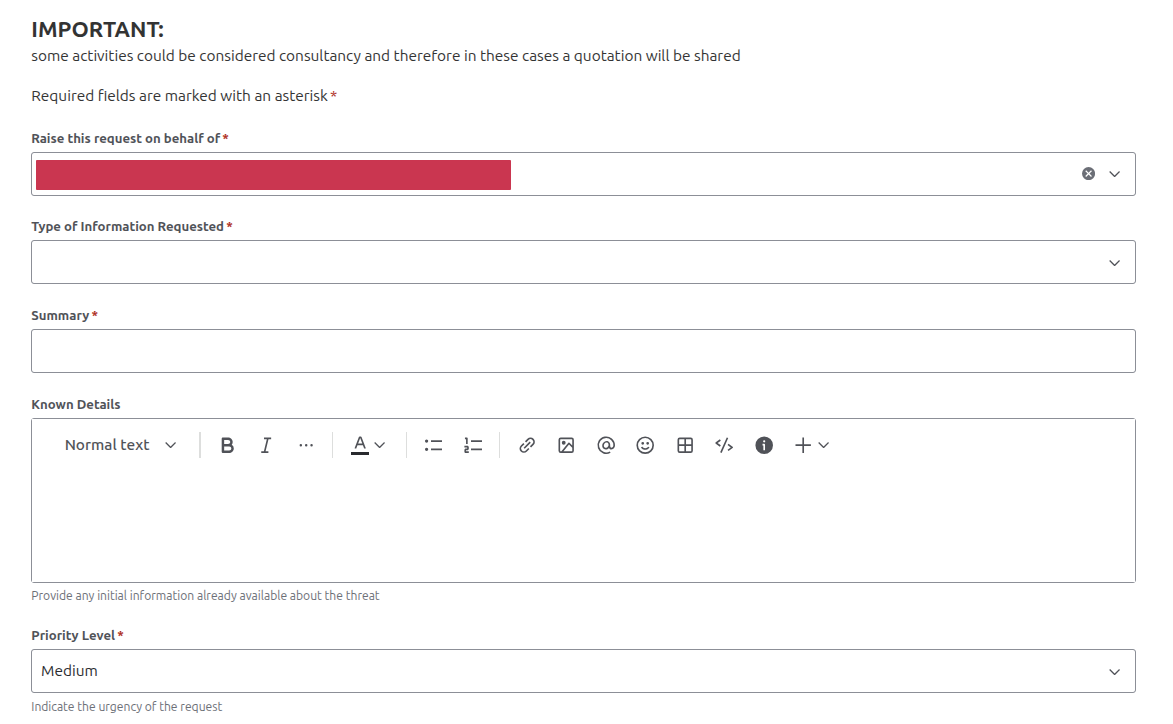
../../../_images/req02.png

In Priority and Request Deadline fields, you can indicate the urgency of your request. This information helps our team prioritize and manage workloads effectively. You can choose between three priority levels: Low, Medium, and High and specify a deadline date if applicable.
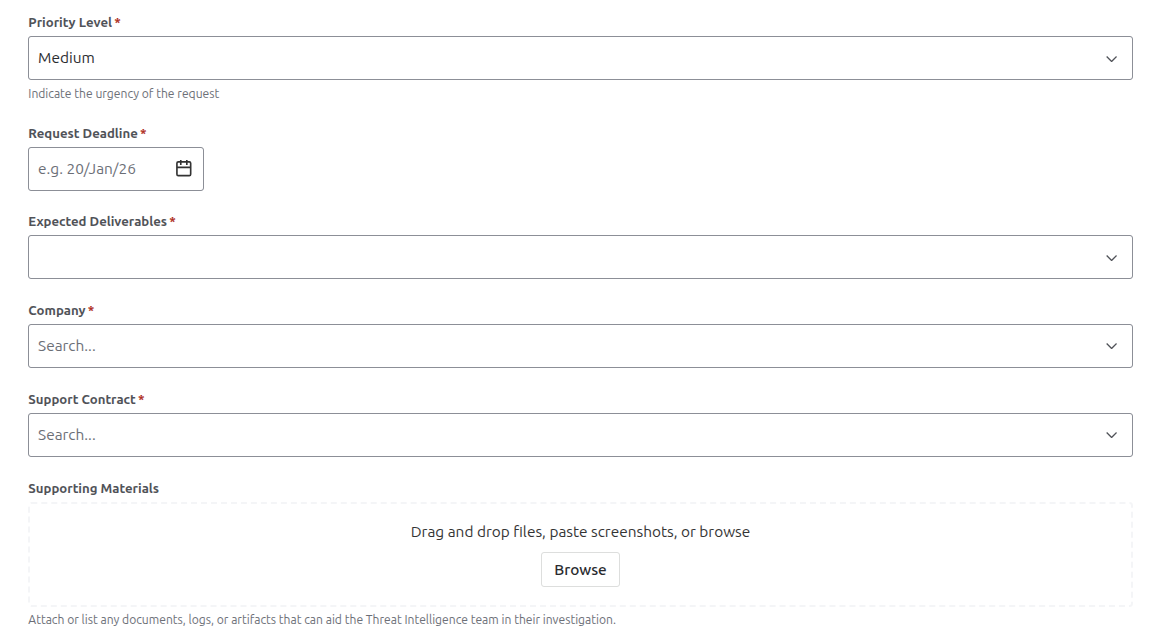

../../../_images/req05.png

In the same section, you can also define the desidered output format for the request. The available options are:

DESIDERED OUTPUT

DESCRIPTION

DETAILED REPORT

Provides a comprehensive summary of findings, analysis, and evidence related to a security incident or a specific request.

SUMMARY OF FINDINGS

Highlights the key observations and conclusions from the security analysis.

IOC LIST

A list of all identified Indicators of Compromise associated with an incident. It supports detection, investigation, and response across security systems

RAW ANALYSIS

Contains data, logs, and observations collected during the investigation with a simple representation. Typically used for initial assessment and further detailed analysis.

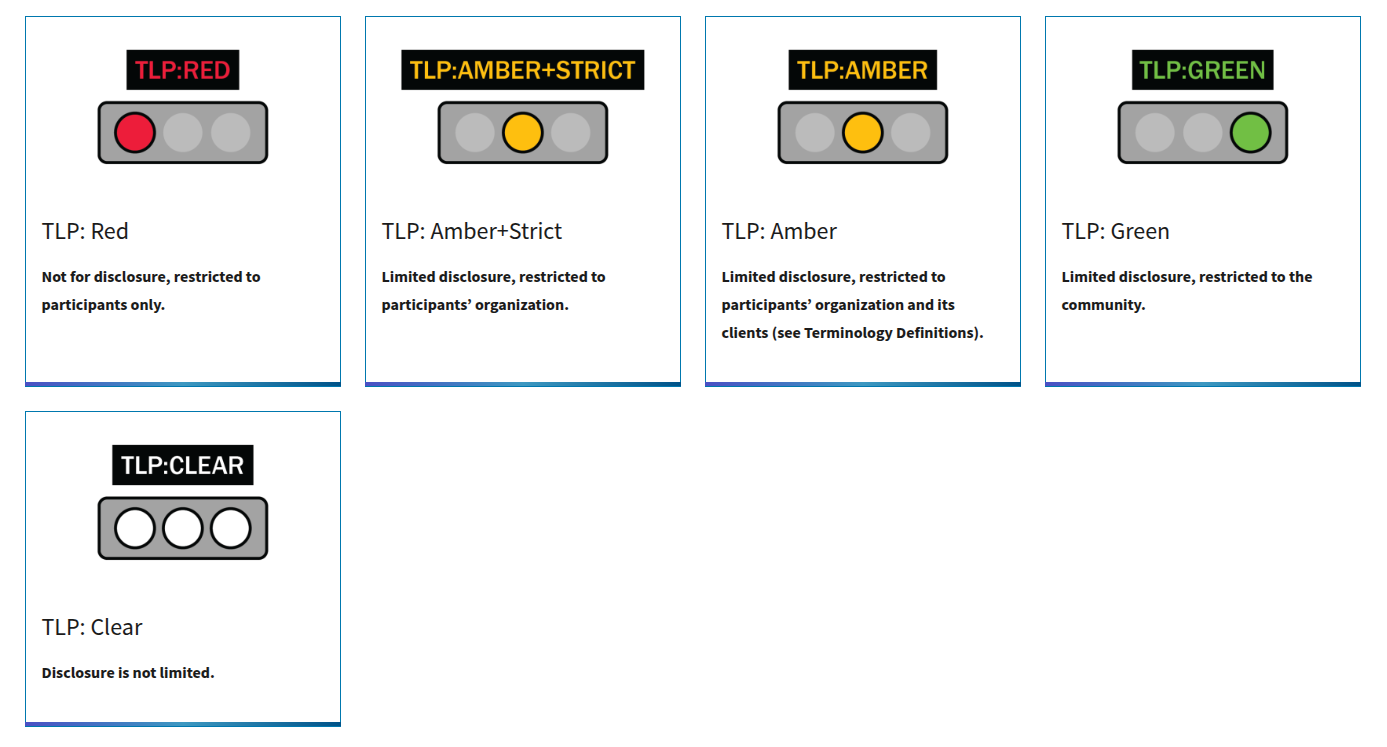
In the Attachments section, you can upload any relevant files that may assist our analysts in understanding and addressing your request. This could include logs, screenshots, or any other supporting documentation. Least but not last, after filling all the required fields, you can also specify the TLP (Traffic Light Protocol) level for your request in the TLP Level section. The TLP is a system used to classify sensitive information and determine how it can be shared.

The available levels are:
../../../_images/tlp.png

TLP

DESCRIPTION

TLP CLEAR

Disclosure is not limited. The output can be shared with any partner and us as intelligence team can consider the shared data as publicly available.

TLP GREEN

Limited disclosure, restricted to the community. The output can be shared with restricted SATAYO community members only and provided data will be shared in accordance with TLP guidelines.

TLP AMBER

Limited disclosure, restricted to participants’ organization and its clients. The output can be shared with restricted participants’ organization and its clients and stakeholders only.

TLP AMBER STRICT

Limited disclosure, restricted to participants’ organization. The output can be shared only within your organization.

TLP RED

Not for disclosure, restricted to participants only. In this case a deciated team will handle the request and the information shared will be threated with the maximum confidentiality.
